
Invideo guide · Creator Economy & Content Creation
Daily Video Content Routine: Make 30 Videos in 1 Afternoon
Reader-supported: links to this product are paid partner links. Akacen may earn a commission at no extra cost to you.
A plain-English look at Invideo's agentic video editor, what it actually does, what it costs, and who it suits.
If your bottleneck is the manual middle of editing — locating takes, repeating the same fix, and getting a team to agree — Invideo's agentic approach is aimed squarely at that, while still leaving you a real timeline to take over. Check the current plan and credit details on the official site before you commit.
Official Invideo site · Confirm current plans and terms before buying.
Paid link · Akacen may earn a commission at no extra cost to you.
Official Invideo websitePaid link, clearly disclosedTerms set by the vendor
Is Invideo for you?
If several of these match what you want, this guide is for you.
- Automate video editing to save significant time.
- Keep publishing consistently with AI assistance.
- Turn one long video into several short clips.
- Plan shots and scripts before you film.
- Keep creative control while agents do the grunt work.
Some links on this page are affiliate links. If you sign up through them we may earn a commission at no extra cost to you.
Where a guide discusses earning from content, we describe how the model works rather than predicting what you will earn.
Read more about who publishes this on the publisher profile.
Chapter 01 · The bottom line
The short answer
To produce consistent video content without burning out, choose formats that match the time you actually have, automate the repetitive editing work with Invideo, and build an audience you can reach directly instead of relying only on a feed.
Akacen Evaluation: Independent Review
The bottom line on Invideo
If your bottleneck is the manual middle of editing — locating takes, repeating the same fix, and getting a team to agree — Invideo's agentic approach is aimed squarely at that, while still leaving you a real timeline to take over. Check the current plan and credit details on the official site before you commit.
What works
- Editing is directed in plain language rather than through prompt engineering.
- The output lands on an editable multitrack timeline instead of a locked render.
- Collaboration, scripting and storyboarding sit in the same workspace as the edit.
- Plans are credit-based per seat, so cost scales with how much you generate.
Trade-offs
- Plans are credit-based, so heavy generation can run through an allowance faster than expected — check the credit maths for your own output.
- The Starter plan limits agent and model access, so compare it against what your work actually needs.
- Annual pricing is shown by default; monthly billing costs more per seat.
- The official site does not publish a refund policy on the pricing page we checked, so confirm terms directly before purchasing.
Official Invideo site · Confirm current plans and terms before buying.
Paid link · Akacen may earn a commission at no extra cost to you.
Are you dealing with this?
- You scrub through hours of footage just to find one usable take.
- The same small fix has to be repeated across dozens of clips.
- Publishing slows down because editing eats your whole week.
- You are an editor, not a prompt engineer, and AI tools keep asking for babysitting.
- Feedback rounds drag because everyone works in separate files.
- One idea needs to become many vertical cuts for different channels.
The cost of waiting: Every week spent on manual trimming and repeated fixes is a week you are not publishing, and inconsistent output is what usually stalls a channel long before quality does.
What Invideo is and how it claims to work
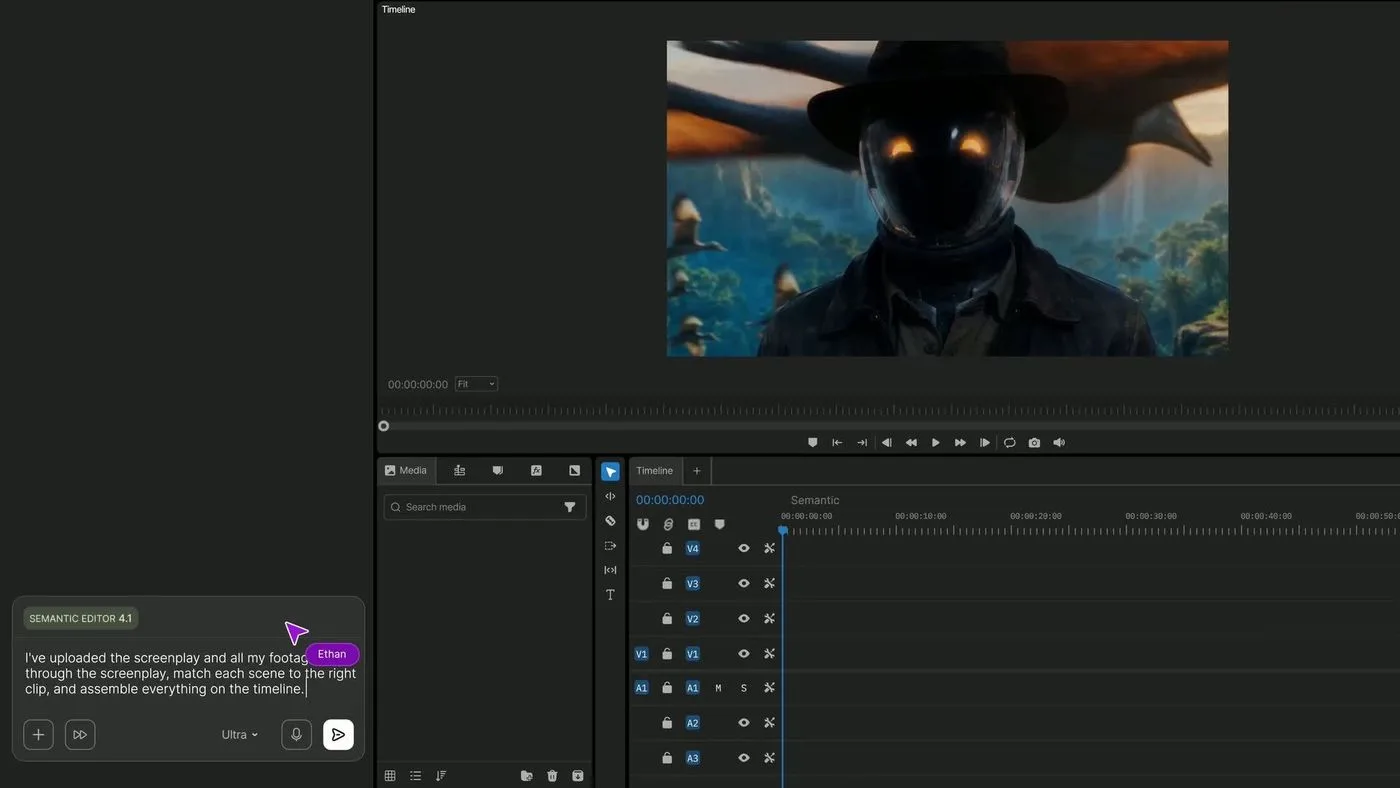
- Invideo describes itself as an agentic video editor: you upload footage, describe the edit in plain words, review the cut and export.
- Its editing agent watches every clip and logs it in memory, so the site says you can find any moment by describing it.
- One instruction can be applied across every shot on the timeline, from cutting pauses to matching the look.
- Edits land on a real multitrack timeline you can take over at any frame, with professional colour, audio and 3D tools.
- Extras on the site include storyboarding, script writing with an AI co-writer, multiplayer editing with live cursors, and custom agents for roles such as cinematographer or sound designer.
Daily routine fit: The site positions it for filmmaking, advertising, microdrama and social media work, where one idea often needs to be spun into many formats.
Inside Invideo


| Feature | What the site claims | What that means for you |
|---|---|---|
| Editing agent with clip memory | Watches every clip and logs it so you can find a moment by describing it | Less time scrubbing timelines to locate a single take. |
| Batch direction | One direction is applied to every shot on the timeline | Repetitive fixes across dozens of clips stop being manual work. |
| Plain-language editing | Describe the edit in ordinary words, no prompt skill needed | A shorter learning curve if you have never used AI tools. |
| Timeline editor | A real multitrack timeline with colour, audio and 3D tools | You can still take manual control at any frame. |
| Multiplayer mode | Real-time collaboration with live cursors | Feedback happens in the project instead of over email. |
| Storyboarding and scripting | Turn a script or idea into a shot-by-shot plan, with an AI co-writer | Planning and writing stay in the same place as the edit. |
| Custom agents | Build agents for roles such as cinematographer, sound or music designer | Repeat parts of your process without redefining them each time. |
| Compliance posture | SOC 2 and GDPR compliant, ISO aligned | Useful if a client or employer asks about data handling. |
| Prompt-to-video | Generates full video drafts (script, b-roll, voiceover, transitions) from a text prompt. | A first draft without filming or sourcing footage. |
| AI voice cloning | Custom voice cloning plus human-sounding AI voices in 50+ languages. | Voiceovers in your own voice or other languages. |
| Stock media library | Access to 16M+ stock clips and images from iStock, Storyblocks and Shutterstock. | Less time hunting for licensed footage. |
| Script-based editing | Edit scenes by changing the script text or fine-tuning media in the timeline. | Change a video as easily as editing a document. |
| Multiple aspect ratios | Exports in 16:9, 9:16 and 1:1. | One project can serve YouTube, Shorts, Reels and feeds. |
| Free vs paid | Free tier exports carry watermarks; Plus and Max give watermark-free HD exports, more iStock credits and voice-cloning slots. | Test it free, pay when you need clean exports. |
Why choose Invideo
- Editing is directed in plain language rather than through prompt engineering.
- The output lands on an editable multitrack timeline instead of a locked render.
- Collaboration, scripting and storyboarding sit in the same workspace as the edit.
- Plans are credit-based per seat, so cost scales with how much you generate.
| Invideo | Generic alternatives | Doing nothing | |
|---|---|---|---|
| Finding a moment in footage | Describe it and the agent locates it | Manual scrubbing or marker discipline | Hours lost every project |
| Repeating a fix across clips | One direction applied across the timeline | Clip-by-clip edits | Inconsistent look |
| Manual control | Full multitrack timeline | Varies by tool | Not applicable |
| Team review | Multiplayer editing with live cursors | File exports and comments | Slow feedback rounds |
Who should be careful
- Plans are credit-based, so heavy generation can run through an allowance faster than expected — check the credit maths for your own output.
- The Starter plan limits agent and model access, so compare it against what your work actually needs.
- Annual pricing is shown by default; monthly billing costs more per seat.
- The official site does not publish a refund policy on the pricing page we checked, so confirm terms directly before purchasing.
Chapter 02 · How it works
Practical guide
Do you find yourself constantly behind on video content for your online business? Many creators struggle to maintain a consistent video schedule, leading to missed opportunities and a feeling of overwhelm.
The cost of inconsistent content is high. Your audience might forget about you, growth can stall, and your authority in your niche diminishes. This directly impacts potential sales and community building.
Prioritize sustainable video formats over complex, infrequent productions.
You might be asking: How can I create compelling videos regularly without spending all my time editing? What tools exist to make this easier? How do I ensure my efforts actually grow my business?
Making content is easy; making it sustainably, and earning from it without misleading anyone, is the hard part. The key is to optimize your creation process and maximize the impact of every piece of content.
First, assess your capacity realistically. Can you commit to one long-form video a week, or are short, daily updates more feasible? Consistency beats sporadic bursts of complex productions every time.
Choosing a video format you can genuinely keep up with is crucial. A simple talking-head video with clear takeaways is often more effective than an over-produced, infrequent one that drains your energy.
Consider repurposing existing content. Turn blog posts into video scripts, or extract key snippets from longer videos for social media. This stretches your effort across multiple platforms and formats.
For those needing to produce polished video quickly, especially with complex editing requirements, tools that leverage AI can be transformative. They can drastically reduce manual editing time.
One such tool is Invideo, designed for serious creatives who want to avoid babysitting AI. It aims to handle the repetitive and time-consuming aspects of video editing, allowing you to focus on creative direction.
Invideo uses 'AI agents' to manage various tasks. You can upload footage and describe the edit you want in plain words. The agent then works on a real multitrack timeline you can later fine-tune.
This means you don't need to become a 'prompt engineer' to get results. You describe your vision, and the AI assists in executing it. This can be a huge time-saver for small teams or solo creators.
A notable feature is its ability to edit multiple shots in one go. Instead of applying changes manually to forty clips, you give one direction, and Invideo's agent applies it across the timeline.
This includes tasks like cutting pauses or matching the look and feel across different shots. Such automation streamlines workflows and maintains visual consistency effortlessly.
Invideo also helps with the pre-production phase. You can storyboard any script or idea into a shot-by-shot plan. This allows for adjustments before any video is even generated, saving time and resources.

Script writing is integrated as well; you can write your script directly within Invideo. An AI co-writer can even assist, helping you refine your narrative and generate ideas.
For team collaboration, Invideo offers a multiplayer mode. Live cursors show what everyone is working on, enabling real-time feedback and synchronized editing for producers, editors, writers, and sound designers.
You can also build your own custom agents within Invideo. These can fill specific roles, acting as a virtual cinematographer, music designer, or colorist, tailoring the AI to your specific needs.
This level of automation can turn one core idea into dozens of vertical cuts suitable for social media. This makes it easier to distribute content widely without recreating it from scratch each time.
Invideo supports various use cases, from filmmaking and advertising to micro-dramas and social media content. It’s designed to help creators think bigger while sweating less over the technical details.
Its pricing is credit-based, with different tiers (Starter, Plus, Max) offering varying numbers of credits and features. Higher tiers provide more credits, additional guest seats, and access to advanced AI agents and models.
For example, the Starter plan includes multiplayer editing up to 5 seats and access to 'Agent Two Lite' only. The Max plan includes more seats, full access to Agent Two, and higher credit counts.
All plans include a full timeline editor and professional tools for color, audio, and 3D. The higher plans also offer more premium stock footage and larger storage allocations.

Compared with editing every clip by hand, Invideo leans on AI-driven automation for the first pass and applies the same change consistently across shots. It aims to reduce the manual grunt work significantly.
Alternatives often require more hands-on editing or are template-based, offering less flexibility in directing AI agents. Invideo's approach is to provide a 'timeline editor with full AI' capabilities.
Who is Invideo NOT for? It might not be ideal for creators who enjoy precise, frame-by-frame manual control over every aspect of their edit and prefer not to delegate creative decisions to AI agents, even with human oversight.
Also, those with very simple video needs, such as basic trimming or adding text overlays, might find its advanced AI features an overkill. A simpler editor might suffice for minimal tasks.
After creating your content, building an audience you own is paramount. Relying solely on social media algorithms can be risky. Direct communication channels are vital.
This is where an owned audience matters. An email list lets you reach viewers directly instead of waiting for a feed to show your work. It gives you control over who sees your content and offers.
Keep the list simple at the start: one signup form, one welcome note, one regular update. A small list you actually write to is worth more than a large one you ignore.
Having a central hub for your content also strengthens your ownership. A simple website, even a single-page one, gives you a permanent online address not dictated by platform rules.

A simple home page under your own address gives your videos somewhere permanent to live. It is the one place a viewer can always find your work, whatever happens on social platforms.
Point that page at the videos you are proudest of and the way to work with you. Keeping it short means you will actually keep it up to date between filming days.
Finally, consider how you will monetize without misleading anyone. Direct sales of your own products or services, rather than relying solely on ads or affiliate links, build trust and provide more stable income.
Focus on providing genuine value in your content. When your audience trusts you, they are more likely to support your business, whether through purchases, courses, or memberships.
You might think buying new gear is essential. However, many creators achieve great results with just a smartphone and good lighting. Focus on your message and compelling visuals first, not expensive equipment.
The biggest trade-off often goes unmentioned: creative control versus speed. AI tools offer speed but require you to trust their interpretation of your vision. Manual editing ensures total control, but demands more time.
Time is your most valuable asset. Every minute spent on repetitive editing is a minute not spent on scripting or audience engagement. Evaluate if an hour saved on editing is worth a slight compromise in precise control.
Think about your energy, not just your time. Burning out from endless editing is a real threat. Investing in tools or strategies that reduce mental fatigue can be more valuable than saving a few dollars.
A typical week might involve scripting on Monday, filming Tuesday, and using AI for a first edit Wednesday. You then refine Thursday, distribute Friday, and engage with your audience over the weekend. Structure is key.
A common mistake beginners make is striving for perfection in every video. This leads to procrastination and inconsistency. Aim for 'good enough' and publish regularly; you can always improve later.
Another beginner pitfall is ignoring analytics. Simply posting isn't enough. Track what content resonates most with your audience. This feedback loop is crucial for refining your strategy.
You'll know your content strategy is working when your audience retention increases. Look for longer watch times and more repeat viewers. These metrics indicate engagement and value.
A growing email list is another strong indicator of success. People opting in directly show they value your content. This builds a robust, owned audience beyond social media algorithms.
You should choose manual editing when your creative vision demands absolute, frame-by-frame precision. If every subtle nuance is critical, human artistic input is irreplaceable. Don't compromise your art.
Opt for simpler tools if your content rarely requires complex cuts or effects. If you mostly record vlogs or talking-head videos, advanced AI features might be unnecessary. Don't overpay for unused power.
Consider live streaming instead of pre-recorded video if authentic, real-time interaction is your priority. This removes the need for extensive editing altogether. It fosters direct community engagement.
When selecting a platform, compare their upload limits and storage capacities. Some free tiers are severely restrictive, forcing you into paid plans sooner. Understand these hidden costs upfront.
Many creators underprice their time. They spend hours learning complex software to save money on a tool. Value your time. Sometimes, investing in efficiency pays off quickly.
Always plan your calls to action (CTAs) before you shoot. What do you want viewers to do next? A clear CTA guides your audience and makes your content more effective. Don't leave it to chance.
Regularly review your video pipeline. Are there bottlenecks? Is one stage consistently slowing you down? Identifying and addressing these points can significantly improve your efficiency.
Don't neglect audio quality. Viewers tolerate less-than-perfect video more easily than poor audio. Invest in a decent microphone; it elevates your content significantly. It's often overlooked by beginners.
Build a content calendar to avoid last-minute panic. Planning your topics, filming days, and release dates keeps you organized. This structure ensures a steady flow of content without added stress.
Think about content pillars. Group your ideas into broader categories. This helps you maintain focus and ensures a diverse yet consistent content offering. It also helps with long-term planning.
Continuously engage with your audience, ask for feedback, and adapt your content strategy. This iterative process helps you stay relevant and prevents creative burnout by keeping you connected to your purpose.
Invideo pricing and packages
As listed on the official site when checked. Prices can change — confirm before buying.
Starter
$20 / seat / mo
Billed annually. 400 credits per seat each month, multiplayer up to 5 seats, limited agent access, 200 GB storage.
Check Starter terms →Official Invideo site · Confirm current plans and terms before buying.
Plus
$50 / seat / mo
Billed annually (normally $60). 2,000 credits per seat, full agent and model access, up to 10 seats, 600 GB storage.
Check Plus terms →Official Invideo site · Confirm current plans and terms before buying.
Max
$100 / seat / mo
Billed annually (normally $150). 5,000 credits per seat, up to 20 seats, 2,000 GB storage, lowest cost per credit.
Check Max terms →Official Invideo site · Confirm current plans and terms before buying.
🛡 Prices, credit allowances and plan contents are taken from the official pricing page at the time of checking and can change. Confirm the current terms on the Invideo site before you buy.
Chapter 03 · What matters most
Key takeaways
- Prioritize sustainable video formats over complex, infrequent productions.
- Use Invideo to automate repetitive editing tasks and keep output steady.
- Build an owned audience you can reach directly, so you control communication.
- Give your videos a permanent home under your own web address.
- Monetize through genuine value and direct sales, fostering trust with your audience.
Watch out for: Do not solely rely on AI tools to define your creative vision; they are powerful assistants, but your unique voice and creative direction remain essential for authentic content and audience connection.
Practical steps
- Evaluate your current content output and identify which parts consume the most time.
- Experiment with Invideo's agent-driven editing by uploading test footage and describing an edit.
- Choose a video format you can consistently produce, such as weekly short tutorials or interviews.
- Start collecting emails from your most engaged viewers so you can reach them directly.
- Set up one simple page under your own web address as your brand's online hub.
- Repurpose one long-form video into 3-5 shorter social clips using Invideo's editing features.
- Plan your next month of video content, focusing on topics directly relevant to your audience's needs.
Why people choose Invideo
Based on what Invideo publishes on its own website, checked at the time of writing.
Built for this job
Automate video editing to save significant time.
Fits into a daily routine
Keep publishing consistently with AI assistance.
Clear on what you get
Turn one long video into several short clips.
Easy to try first
Plan shots and scripts before you film.
Chapter 04 · Before you decide
Decision checklist
Three checks to make before acting on this guide.
| Check | What good looks like |
|---|---|
| Chosen a video format you can consistently maintain (e.g., weekly, short-form)? | Yes, my chosen format fits my time and resources. |
| Explored Invideo's AI editing to automate repetitive work? | Yes, I am using it to speed up editing tasks. |
| Started collecting emails so you can reach viewers directly? | Yes, I am building a direct communication channel. |
Verdict: start with the smallest reversible version, then expand using real results.
Do this next
Your next steps
- 1Evaluate your current content output and identify which parts consume the most time.
- 2Experiment with Invideo's agent-driven editing by uploading test footage and describing an edit.
- 3Choose a video format you can consistently produce, such as weekly short tutorials or interviews.
- 4Start collecting emails from your most engaged viewers so you can reach them directly.
- 5Set up one simple page under your own web address as your brand's online hub.
Chapter 05 · Questions answered
Common questions
How can I avoid video editing burnout as a solo creator?
Focus on simplified, consistent formats. Use Invideo to automate repetitive editing tasks, freeing up your time for creative direction and audience engagement.
What does owning your audience mean for content creators?
It means having direct communication channels with your viewers, such as an email list and your own website. This reduces reliance on platforms that control who sees your content.
Is AI video editing suitable for complex projects?
Invideo is designed to handle longer projects through a timeline editor with full AI. You describe the edit, agents perform tasks across multiple shots, and you keep oversight.
Can AI help with pre-production tasks for videos?
Yes. Invideo can turn an idea into a shot-by-shot plan and help write scripts with an AI co-writer, which streamlines the planning stage significantly.
What is the best way to earn from content without misleading people?
Focus on providing genuine value that solves a problem. Monetize through direct sales of your own products or services, which builds trust and is steadier than ads alone.
Chapter 06 · Final verdict
Final thoughts
The core decision for small online businesses in content creation is balancing quality with consistency. Relying on manual effort alone often leads to burnout and uneven output, which slows audience growth.
By using Invideo for the repetitive production work and building direct audience relationships, you can hold a high standard without sacrificing your time or integrity.
Your clear next action is to look at your current workflow, pick the one repetitive task that costs you most, and try automating it in Invideo before your next filming day.
Sources and further reading
Independent references checked at publication time. Akacen has no commercial relationship with these sources.
Akacen editorial team
Independent, practical publishing
Akacen covers online business, money, security and software. Guides combine careful research with practical checks, clearly marked partner links and no paid rankings.
About AkacenHow we reviewContactYouTubePinterestInstagramTikTok
Our recommendation on Invideo
If your bottleneck is the manual middle of editing — locating takes, repeating the same fix, and getting a team to agree — Invideo's agentic approach is aimed squarely at that, while still leaving you a real timeline to take over. Check the current plan and credit details on the official site before you commit.
Official Invideo site · Confirm current plans and terms before buying.
Paid link · Akacen may earn a commission at no extra cost to you.
Some links on this page are affiliate links. If you sign up through them we may earn a commission at no extra cost to you.
Where a guide discusses earning from content, we describe how the model works rather than predicting what you will earn.
Read more about who publishes this on the publisher profile.
Official Invideo site · Confirm current plans and terms before buying.